
For guests
How to ask for dates
How to send a request for a place to stay to the host on the property page.
You do not need an account. A request is free and you make no commitment.
Procedure
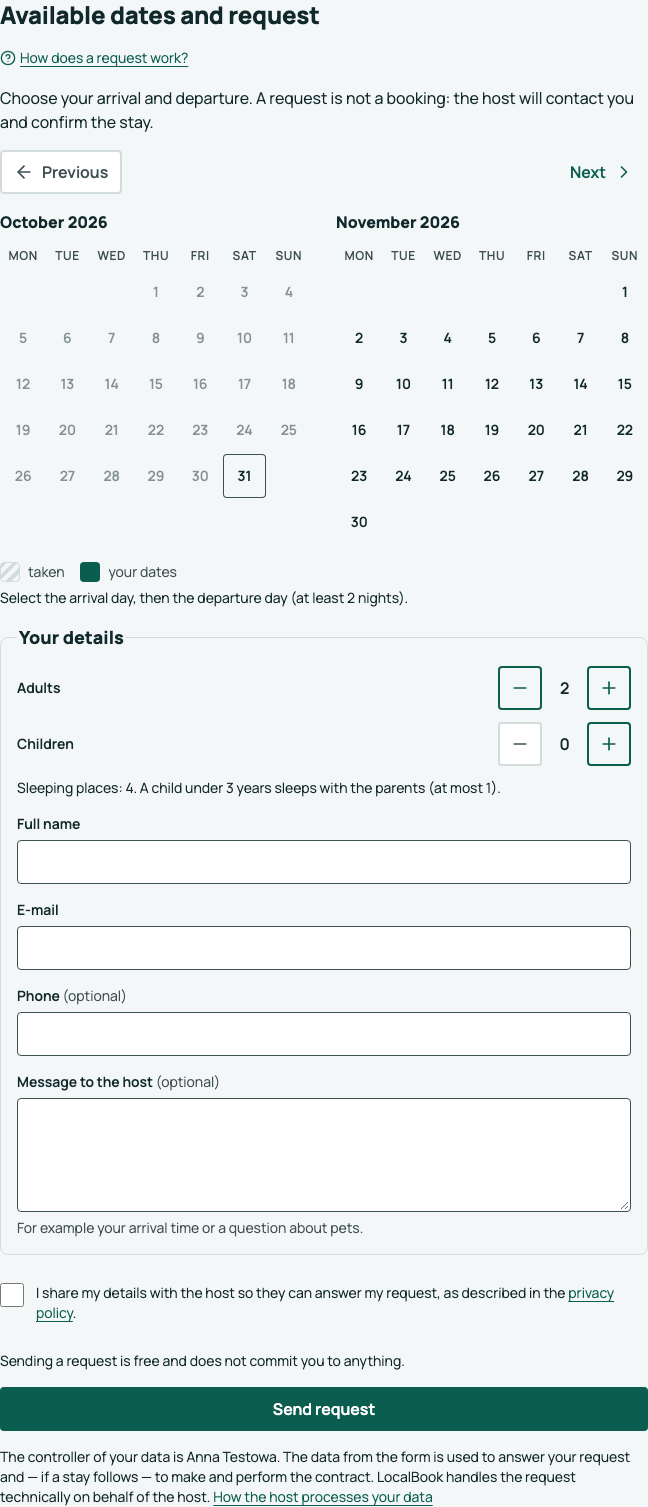
- On the property page, go to Ask about dates.
- In the calendar, click the day of arrival, then the day of departure. The calendar shows the taken days.
- Select the Number of guests.
- Enter your Full name and E-mail. A phone number and a Message to the host are optional.
- Select the consent to give your data to the host.
- Click Send request.
A guesthouse with rooms
If the property has several room types, its page has a Rooms section. Click Ask about: … next to the room you want, or choose it in Room type in the form. The calendar then shows the free dates of that type, and the number of guests how many the room takes. One request is for one room; if you need two, send two requests. The host chooses the exact room.
What happens next
The message "Request sent", the request number, what happens next and the See your request button show. If something is missing in the form, a list of the fields to complete shows at the top — click a field in the list to go to it. You also get an e-mail with a summary. The host contacts you, and LocalBook sends you an e-mail with the decision of the host.
The dates are not booked yet. They are yours only when the host confirms the stay.
The e-mail has a See your request button. On that page you can check the status of the request and withdraw it.
If there is a problem
- "Some of these nights have just been taken": the calendar is updated. Select different dates.
- "Too many requests were sent from here": try again later, or contact the host directly. The phone and e-mail of the host are on the property page.