
How to
Ask for a deposit
How to ask the guest for a deposit by bank transfer after you accept a request, and confirm the stay when it is paid.
LocalBook can send the guest the transfer details for a deposit immediately after you accept a request. When you see the payment on your account, mark it, and the stay is confirmed. LocalBook does not handle the money — it goes directly to your account.
Set the deposit for a property
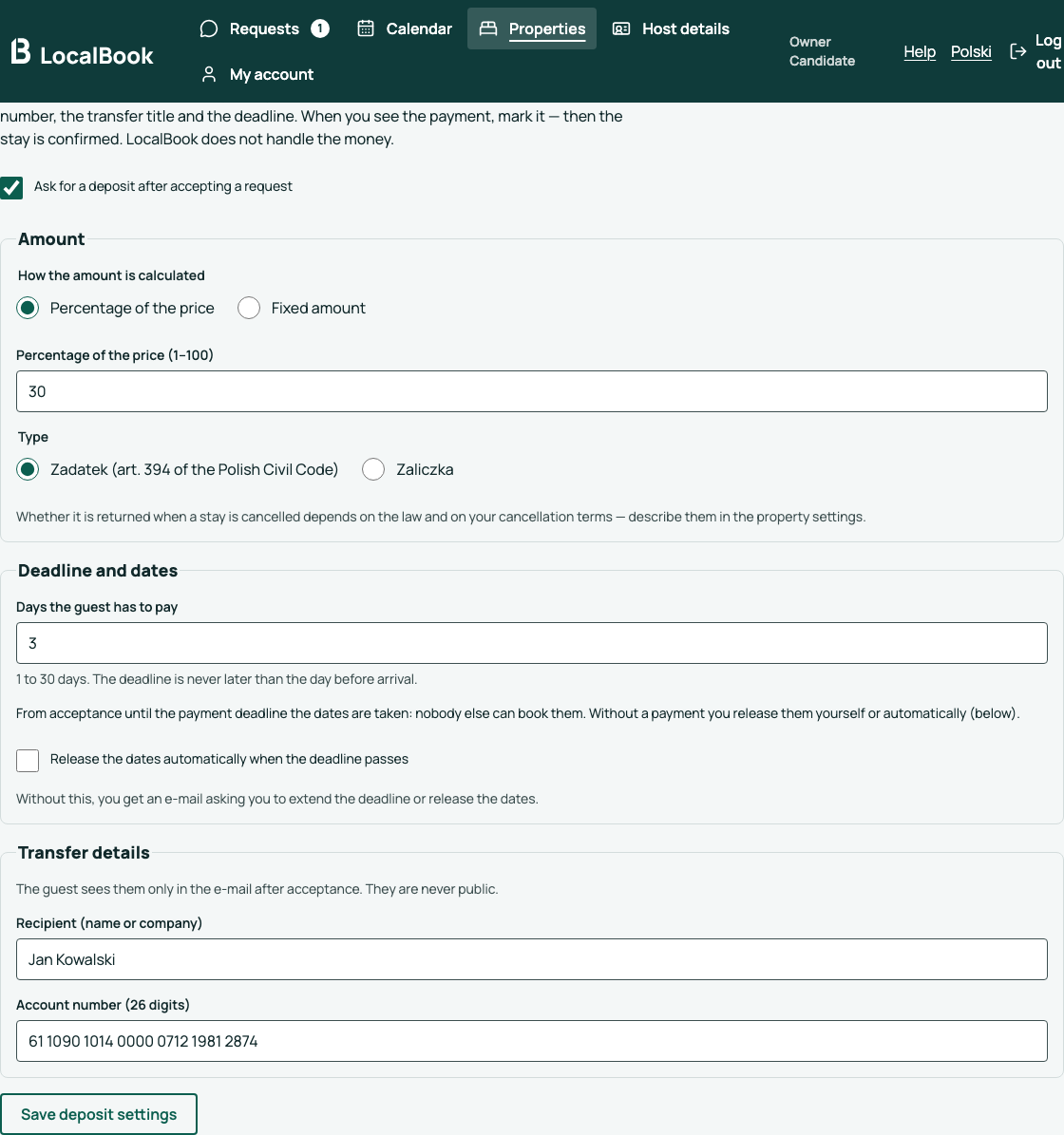
- Open the property in the dashboard and go to the Deposit tab.
- In the Deposit tab, select Ask for a deposit after accepting a request.
- Select the amount: Percentage of the price or Fixed amount.
- Select the type: zadatek or zaliczka (the difference is below).
- Enter the number of days the guest has to pay.
- Decide if an accepted request takes the dates before the payment.
- Enter the recipient and the account number (26 digits). Click Save deposit settings.
Accept a request
- In the menu, click Requests.
- Next to a new request, click Ask for a deposit.
- Enter the price that you agreed with the guest. LocalBook calculates the deposit — you can change it. You can also change the deadline.
- Click Send the deposit request.
The guest gets an e-mail with the amount, the account number, the transfer title (the request number and the word "zadatek") and the deadline. The request now has the status Awaiting deposit.
When the money arrives
- Next to the request, click Deposit received.
- Check the amount and the payment date. Click Save payment and confirm stay.
The stay is confirmed, and the guest gets an e-mail with the amount to pay on arrival.
When the money does not arrive
- On the deadline day, the guest gets a reminder.
- One day after the deadline, you get an e-mail. Click Change deadline to give the guest more time, or Release dates to make the dates free again.
- If you select Release the dates automatically in the settings, LocalBook releases the dates one day after the deadline and tells you and the guest.
Does an accepted request take the dates?
This is your choice in the property settings:
- Yes — the dates are taken from acceptance. Nobody else can book them until you release them.
- No — the dates are taken only after the payment. You can accept more than one request for the same dates; the guest whose payment you mark first gets the stay. Release the dates of the other requests.
Zadatek or zaliczka
Both are a part of the price paid in advance. They have different rules for a refund when the stay is cancelled:
- Zadatek — art. 394 of the Polish Civil Code gives the rules. If the guest gets it back (and how much) depends, for example, on who cancelled the stay and why.
- Zaliczka — the law and your agreement with the guest give the rules for a refund.
Describe your rules in the cancellation terms of the property. The guest sees a short, neutral explanation in the e-mail. If you are not sure which type to use, ask a lawyer or an adviser.
Without a deposit
A regular guest or a short notice? Click Confirm without deposit — the stay is confirmed immediately.